Bird Feathers: A Typeface for Delicate Details
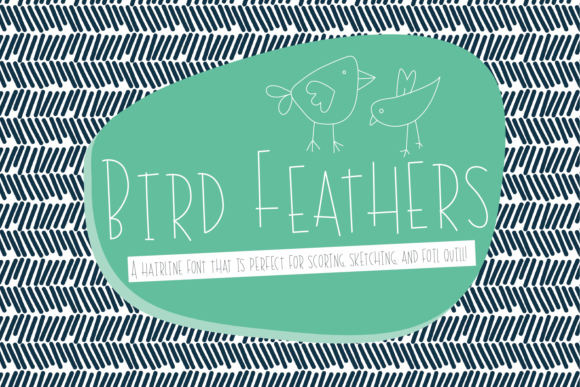
There's a moment in every creative project where the details either sing or fall flat. You've spent hours perfecting a logo, arranging a social media graphic, or designing a wedding invitation, only to find that the standard, bold fonts feel too heavy, too loud. They overwhelm the delicate balance you've worked to create. This is where a specialized tool like the Bird Feathers font becomes not just useful, but essential. It’s a typeface born from a specific need: to achieve intricate, hairline detail for scoring, sketching, and foil quill work. Its unique construction means it won't look like a typical print font in your preview window, but that's by design. It's engineered for a different kind of output—one that requires precision and a light touch.
The Art of the Hairline: When Less is More
Understanding the core appeal of Bird Feathers means appreciating the beauty of a single, clean line. In a world saturated with bold, blocky graphics, there's a growing demand for designs that feel personal, crafted, and refined. This font delivers exactly that. Its "quirky hairline design" isn't just thin; it's intentionally minimalist. For creators using a Glowforge for engraving, a Silhouette for intricate paper cuts, or a Cricut for delicate vinyl decals, this characteristic is gold. The magic happens when you set your software to "no-fill" and simply apply a line color. The result is a solid, continuous letterform with no center voids—the perfect score line or sketch pen stroke.
This specificity is its greatest strength. You're not fighting with a font designed for 12-point body text. You're working with a typeface that understands the limitations and possibilities of your tools. It’s a premium font in the sense that it solves a niche problem with elegant efficiency, making it a valuable asset in any designer's toolkit.
Practical Applications: Beyond the Screen
Where does a font like this truly shine? Its value is realized in projects where physical texture and dimension are key. Consider these real-world scenarios:
- Branding & Logo Design: For brands that emphasize craftsmanship, luxury, or nature, a logo created with Bird Feathers can be etched onto packaging, embossed on business cards, or burned onto leather goods. It communicates attention to detail and a handcrafted ethos.
- Packaging & Merchandise: Imagine a boutique candle brand or an artisanal chocolate maker. Using this font to score the company name onto a kraft paper box or sketch it onto a fabric tag adds a layer of tactile sophistication that printing alone cannot achieve.
- Invitations & Event Stationery: This is a natural fit. Wedding invitations, event programs, or place cards scored with a metallic foil quill using this typeface become keepsakes. The delicate lines catch the light beautifully, offering a preview of the event's elegance.
- Editorial Layouts & Posters: For a magazine spread or a limited-edition art print, using a font like Bird Feathers for headlines or pull quotes can create a striking, modern typography effect, especially when combined with a bold sans-serif font for contrast.
Integrating Delicate Typography into Your Brand System
A strong brand identity relies on a consistent visual language. While you likely have a primary serif font for authority and a sans-serif font for clarity, a specialty typeface like Bird Feathers can serve as a powerful accent. It’s not meant for your website's body copy or your blog's main text. Its role is more strategic.
Use it for specific marketing assets that will be physically produced: the thank-you note included with online orders, the header for a premium PDF catalog, or the title slide for a client presentation that will be printed. By reserving this display font for these high-touchpoints, you create moments of surprise and delight that reinforce your brand's premium positioning. The key is font pairing. Test it alongside your existing fonts. Does it complement your script font or your handwritten font? The goal is a harmonious hierarchy where Bird Feathers acts as a delicate accent, not the main voice.
From Digital File to Tangible Object: A Workflow Tip
Using this font effectively requires a slight shift in mindset from typical digital design. Here’s a simple workflow to get the best results:
- Design in Vector: Work in a program like Adobe Illustrator or Inkscape. Type out your text using the Bird Feathers font.
- Convert to Outlines: This step is crucial. It turns the editable text into a vector shape, ensuring the software interprets the hairline paths correctly for your machine.
- Set the Stroke: In your design software, ensure the object has a stroke (line) color and is set to "no fill." The stroke weight can often be set to a very thin value, like 0.1pt, for the finest line.
- Prepare for Your Machine: Import the outlined vector file into your cutting or engraving software (Cricut Design Space, Silhouette Studio, Glowforge App). Set your operation to "Score," "Sketch," or "Engrave" accordingly.
This process ensures you leverage the font's unique design, transforming a digital design asset into a physical masterpiece. Remember, the commercial licensing for such a font typically covers the sale of end products, making it a sound investment for small business owners and entrepreneurs creating merchandise.
In the end, Bird Feathers isn't just another typeface. It's a problem-solver, a texture-creator, and a subtle brand-builder. It fills the gap between a bold graphic and a whisper-thin line, offering designers and crafters a way to add a professional, refined touch that truly stands out. For your next project where detail is paramount, it might just be the perfect tool.